Link items and follow the trace
Link a requirement to a risk, a scope line or another requirement by searching for it, and see an item's parents, children and links in the side panel.
Updated 19 October 2026
A link says that two items belong together: a requirement and the risk it addresses, a requirement and the scope line it comes from. Links stay in place when you move items around the tree, and a link always shows on both items.
Link two items
- Open a requirement by clicking it in any view.
- Scroll to Traceability.
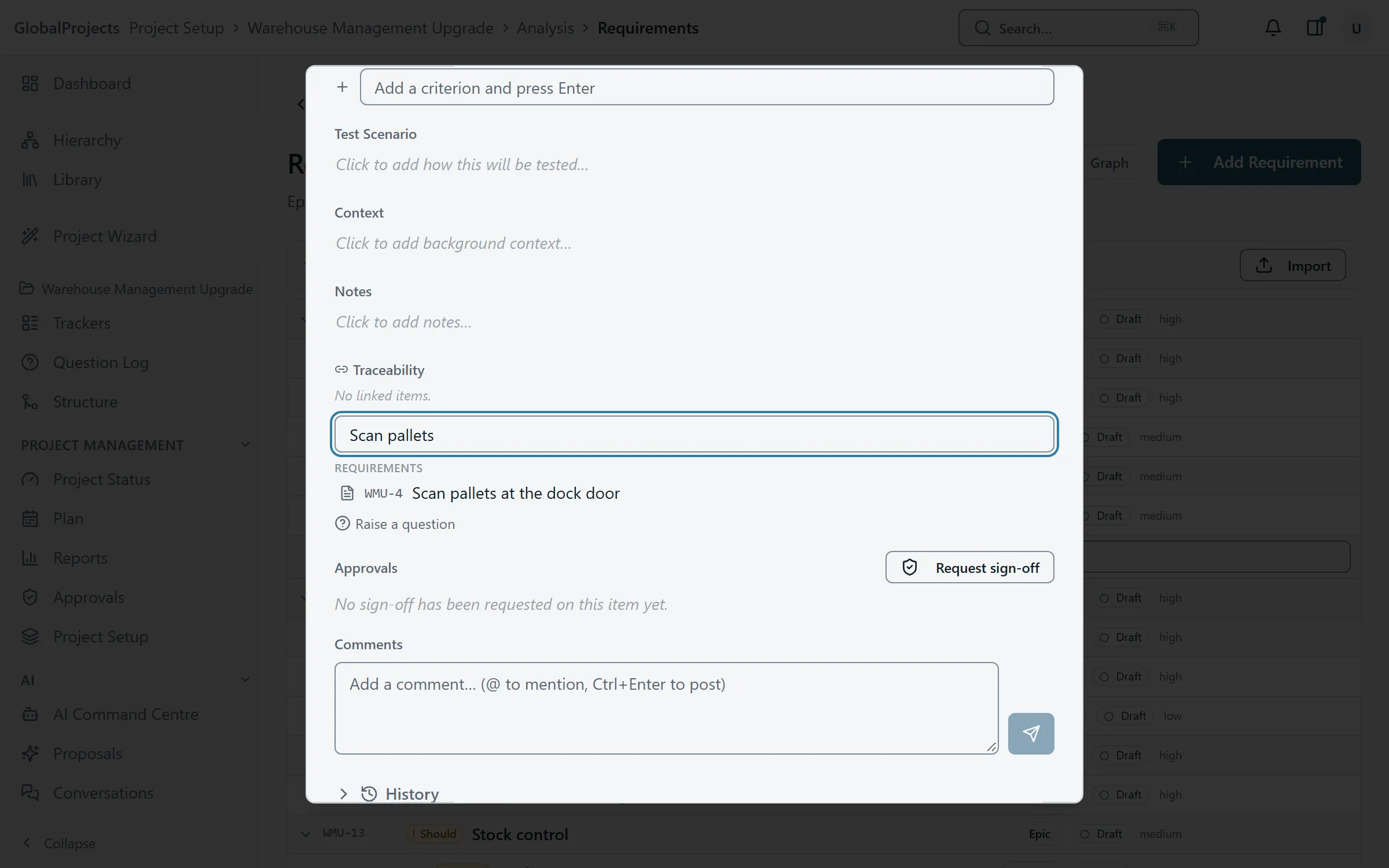
- Click in the box that says Link an item — search by title, or a key like your project's key.
- Type at least two characters of the other item's title or key.
- Choose the item from the results. They are grouped under Requirements, Trackers, Scope and Analysis.
Remove a link
- In the item's Traceability section, point at the link.
- Choose the cross that appears, labelled Remove link.
See the whole trace in the side panel
- Select an item, by opening it or by moving to its row in the spreadsheet.
- Choose the panel button at the top right of the screen to open the side panel.
- Choose the Traceability tab.
- Read Scope, Parent chain, Children and Linked items. Choose any of them to go to it.
Raising a question from an item
Under Traceability there is a Raise a question button. Type the question and press Enter. It is added to the Question Log and linked to the item you are on. See The Question Log.
Good to know
- Every link you add this way is of the kind Relates to. You do not need to choose a type.
- A requirement created from a scope line is linked to it automatically.
- If the side panel says “Loaded a while ago — links added elsewhere may not be shown”, choose Refresh.
- To see which requirements have no links at all, use the traceability matrix.
Related articles
- Trackers — risks, issues, assumptions, dependencies, decisions and ideas
Keep risks, issues, assumptions, dependencies, decisions and ideas beside your requirements, add them quickly and link them to what they affect.
- Scope lines and the scope document
Record what is in and out of scope, turn an in-scope line into requirements, and print or export the scope document.
- The traceability matrix
See which requirements link to scope, risks, tests and each other, find the requirements that link to nothing, and narrow the matrix to one class or level.