The Project Wizard
Set a new project up from its source material in ten guided steps — add sources, run each step, review what it proposes, accept or skip.
Updated 19 October 2026
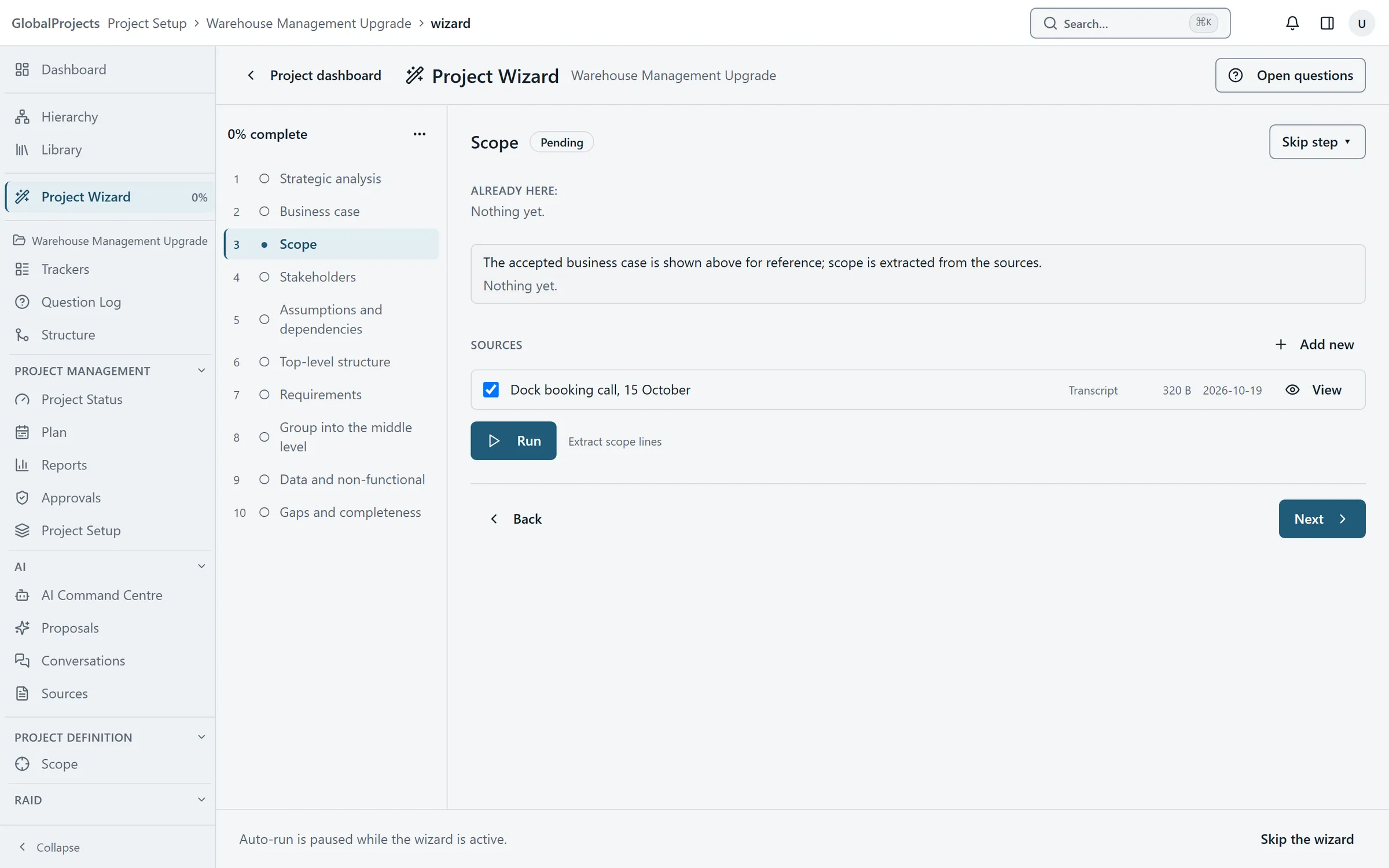
The Project Wizard walks a new project from its source material to a structured set of requirements in ten steps, from Strategic analysis to Gaps and completeness. Each step is the same four moves: choose or add sources, run the analysis, review what it proposes, then accept or skip.
Every accept is yours. Proposals arrive ticked so you can review them quickly, but nothing is added to the project until you choose Accept on rows you can see.
Start the wizard
- Open the project. Until the wizard has been started or skipped, opening the project takes you straight to it. You can also choose Project Wizard in the left navigation.
- Read Set this project up, step by step and choose Start.
- The steps are listed on the left. The first, Strategic analysis, opens.
Work through a step
- Under Sources, tick the documents to read. Choose Add new to paste or upload another.
- Choose Run. The line beside it shows its progress, for example Running and then Proposed 12 items.
- Under Review, read each proposed row. Untick any you do not want.
- Choose Accept. The step is marked done.
- Choose Next › to move on.
Skip a step, or finish
- To leave a step out, choose Skip step ▾, add a reason if you like, and choose Skip.
- If the work for a step already exists, choose Skip step ▾ and then Mark done by hand.
- On the last step, run Remove duplicates and accept or discard what it finds. The wizard cannot finish until you have.
- Choose Finish. You see The wizard is complete and a count of everything it created.
The ten steps
- Strategic analysis — the problem statement, objectives and alignment.
- Business case — the executive summary, strategic fit, recommendation and benefits.
- Scope — in-scope and out-of-scope lines.
- Stakeholders — the people and organisations named in the sources.
- Assumptions and dependencies.
- Top-level structure — your epics, or whatever your top level is called.
- Requirements — captured under each parent, then a sweep for anything left over.
- Group into the middle level — features between epics and stories.
- Data and non-functional — the requirements the sources imply but do not state.
- Gaps and completeness — duplicates, missing analysis, and answers to open questions.
Leaving and coming back
You can leave at any time. Your place, your ticked sources and any runs in progress are kept; choose Project Wizard in the left navigation to return. The percentage beside it shows how far you have got.
Open questions
Choose Open questions at the top of the wizard to see the project’s open questions and answer them without leaving the page.
Automatic runs are paused
While the wizard is active, AI steps that would start by themselves when a source is uploaded are paused. Runs you start in the wizard are not affected. They resume when the wizard finishes, or if you abandon it.
Each run costs money
Every Run is a paid AI call. Some steps show an approximate number of calls before you run them. Draft again on a step that has already run is a second paid run.
Stopping the wizard
Choose Skip the wizard to set the project up by hand instead. To stop part way, open the … menu above the steps and choose Abandon the wizard…. Nothing it created is removed, and you can reopen it later.
If the wizard says AI is not set up
The wizard only works when AI is set up for your company. Until it is, you can skip the wizard and work by hand. See Getting AI switched on for your company.
Related articles
- Add sources — notes, transcripts and documents
Give the project the material the AI reads — paste a transcript or upload a document — then view it, hold it or delete it.
- Review what the AI proposes
What "AI proposes, you decide" means in practice — read each proposal and its evidence, edit it or ask the AI to change it, then accept or discard.
- The Question Log
Raise open questions for the project or against any item, record the answer and who gave it, and let an answer propose the requirements it unblocks.